๐Ÿ”ฅ The all-in-one app built for hood cleaners

Run your whole hood-cleaning business, and never miss a rebook again.

Kitchen Tracker remembers every 90-day cleaning, follow-up, and unpaid invoice so you don't have to. It schedules your jobs, dispatches your crew, sends NFPA-96 reports, and gets you paid. One place, instead of a notebook, a spreadsheet, and a separate invoice app.

Or sign up for a walkthrough demo and we'll reach out to schedule.
30-day money-back guarantee Try it with real data, no signup Your data exports anytime
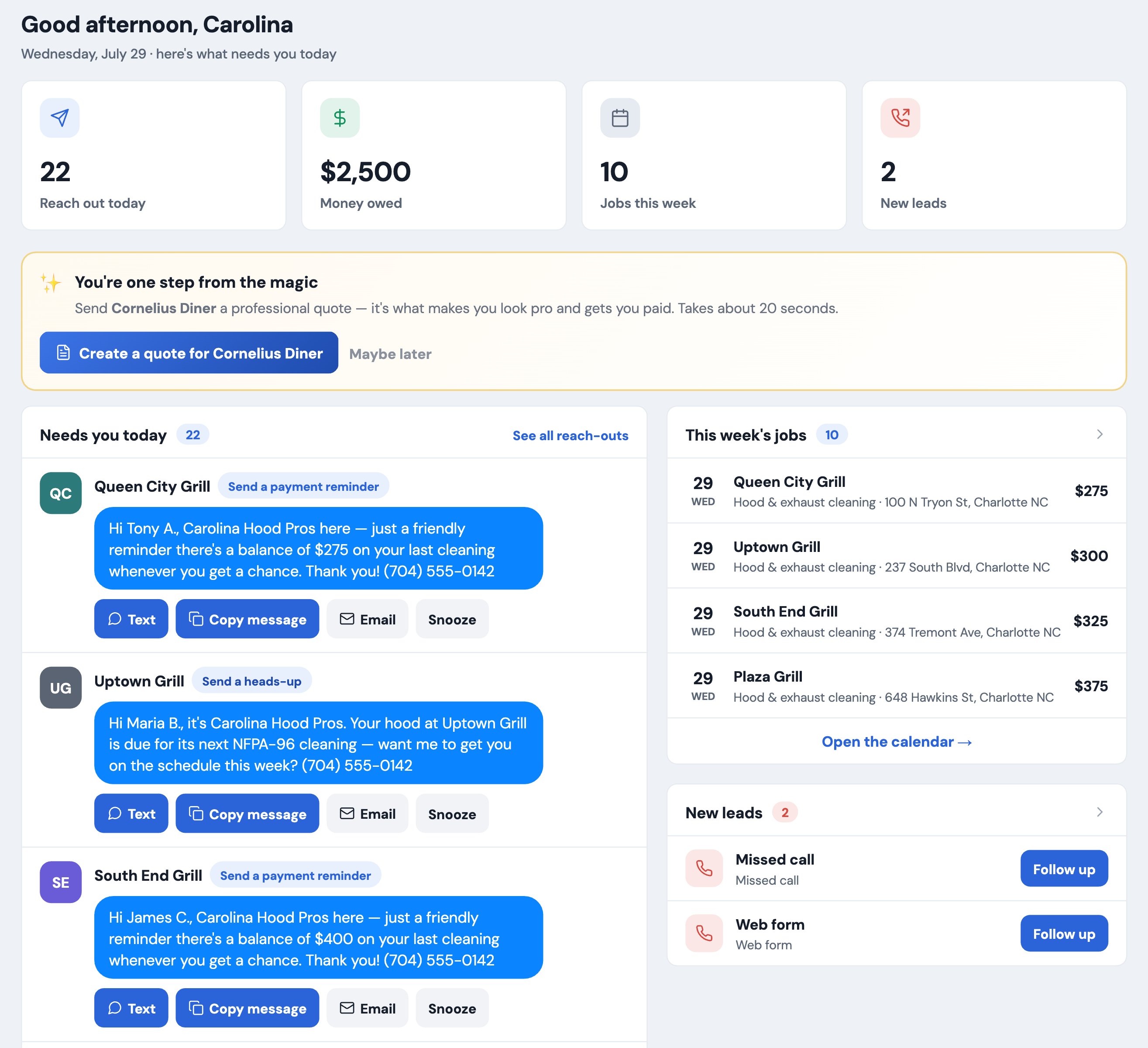
Kitchen Tracker dashboard showing today's reach-outs, this week's jobs, money owed and new leads
Your morning in one screen, exactly what needs you today.
NFPA-96 done rightReports your fire marshal and insurer accept
No lock-in, everExport everything with one tap
Daily cloud backupsNothing lives on one phone
Built for one tradeNot a generic tool bent to fit
Sound familiar?

You didn't start a hood-cleaning company to drown in paperwork.

Every one of these is a quiet leak in the business. You're probably living with a few right now.

โœ•

You forgot to rebook a quarterly account, and found out when they called someone else.

โœ•

You're chasing a restaurant for a $325 invoice from two months ago, again.

โœ•

Your "NFPA report" is a photo of a handwritten form the fire marshal squints at.

โœ•

The business runs on a notebook, your texts, a spreadsheet, and a separate invoice app.

โœ•

You added a second truck and now have no idea who's doing what today.

โœ•

A chain wants you, but pays in 60 days and makes you re-type every report into their portal.

Why it's different

The compliance apps stop at the report. The big platforms don't know your trade.

Kitchen Tracker does the whole job, because it was built for exactly one job.

Best-in-class compliance

NFPA-96 reports with before and after photos and a certificate for your fire marshal and insurer, in minutes.

Actually runs the business

Rebooking reminders, get-paid tools, crew scheduling, and QuickBooks, the daily operations the niche apps skip.

Handles national accounts

Chain hierarchy, work orders, and a proof-of-service package that ends the ServiceChannel and Corrigo re-keying.

Everything it does

Every feature, laid out. Tap any row to open it.

This is the whole app, top to bottom. Open the ones you care about and read exactly how each part works, with a screenshot where it helps.

Customers & records

A record built for this trade.

Everything on an account, from gate codes to compliance status, organized so it never overwhelms.

The hood-cleaning customer record

A real record, not a generic contact card. Eleven organized cards cover the site and access or gate codes, the cooking type and fuel that set the NFPA cleaning interval, the equipment on the roof, the fire-suppression system, and full NFPA-96 compliance status.

It all opens progressively, so a rich account never feels like a wall of fields. You see the next action first, and the deep detail is one tap away when you need it. A compliance chip tells you at a glance whether the account is current or overdue.

A detailed hood-cleaning customer record with access codes, cooking type, contacts and compliance status
The customer page: next action up top, deep detail organized into cards below.
Multiple contacts and certificate routing

Keep every contact at an account: the GM, the owner, the maintenance manager. Mark who is primary, whether they prefer a text, a call, or email, and exactly who should receive the NFPA-96 certificate. No more guessing where the report goes, or which number to call when you are standing at a locked back door.

Cooking type drives the schedule

Set a restaurant's cooking type and Kitchen Tracker knows the NFPA-96 interval: monthly for solid fuel, quarterly for high volume, semi-annual, or annual. It drives the automatic rebooking off that interval, so your compliance and your revenue stay on the same schedule without you doing the math.

The customer table, search and bulk actions

See all your accounts in a clean, sortable table. Filter to who is due, who owes you, or by tag; save the views you use most; and edit dozens at once with bulk actions. Fast filter, sort, and search are built for the owner running hundreds of restaurants, not a dozen.

Import your history in minutes

Bring years of customers and past cleanings in from a spreadsheet, so you start with your whole book of business instead of a blank screen. Import past history and the compliance clock picks up right where your records leave off. Most owners are fully loaded in an afternoon.

Scheduling & never-miss

The money is in the schedule.

The one habit that separates a full route from a truck with gaps, handled for you.

Automatic rebooking, the never-miss engine

Every account has a cleaning cadence, and Kitchen Tracker calculates the next-due date automatically and puts it in front of you before it lapses. This is the single feature that plugs the biggest revenue leak in the trade: the forgotten rebooking that quietly hands a restaurant to a competitor.

You are the one saying "you're due" first, every time, without keeping any of it in your head.

The visual job pipeline

Every job moves through a clear pipeline: Scheduled, then En route, In progress, Done, and Paid. A step indicator shows a green check for finished steps, a highlighted step for where the job is now, and greyed steps for what is still ahead, so at a glance you always know exactly where each job stands and what is left to do.

Job details and a what-to-bring checklist

Set the service type, job size, and arrival window, and build a gear checklist: degreaser, filters, fan belts, containment bags. The truck gets loaded right and nothing gets left behind on site. Duplicate the last job at an account and the details you already entered come along, so repeat visits take seconds to book.

Calendar, reminders and tasks

A full calendar plus recurring reminders and one-off tasks keep the whole week in front of you: confirmations, follow-ups, and anything you would otherwise scribble on a sticky note. Nothing depends on you remembering it at 9pm.

Map and day routes

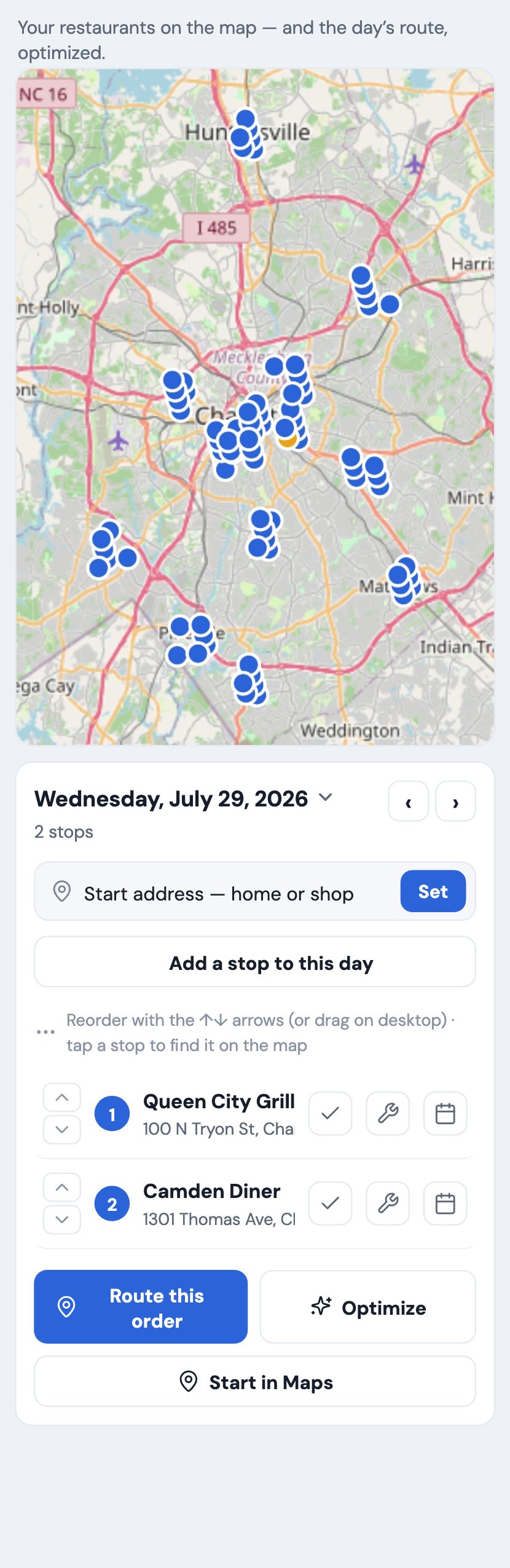
See all your restaurants on a map with color-coded pins. Build the day's route, add a stop for an existing job or an off-system errand, and hand off to your phone's maps for turn-by-turn driving. Blue and amber pins tell you at a glance what is on the route and what still needs one.

Restaurants on a map with the day's route, on a phone
The map and day's route, on the phone in the truck.
The morning dashboard

Open the app and know your whole day.

Your day on one screen

The home screen is a prioritized worklist, not a wall of charts. It shows the reach-outs due today, this week's jobs, the money owed, and new leads, in the order they need you. It answers the only question that matters first thing in the morning: what do I actually have to do today.

Each number is a live tile. Tap money owed and you are in the accounts-receivable view. Tap a reach-out and the text is ready to send. The dashboard is where the whole business starts its day.

The home dashboard: today's reach-outs, this week's jobs, money owed and new leads
Home: a prioritized worklist of exactly what needs you today.
NFPA-96 compliance & reporting

The report that wins bids and keeps the fire marshal happy.

A first-class NFPA-96 report, not a generic form bent to fit, done in about three minutes.

The NFPA-96 service report

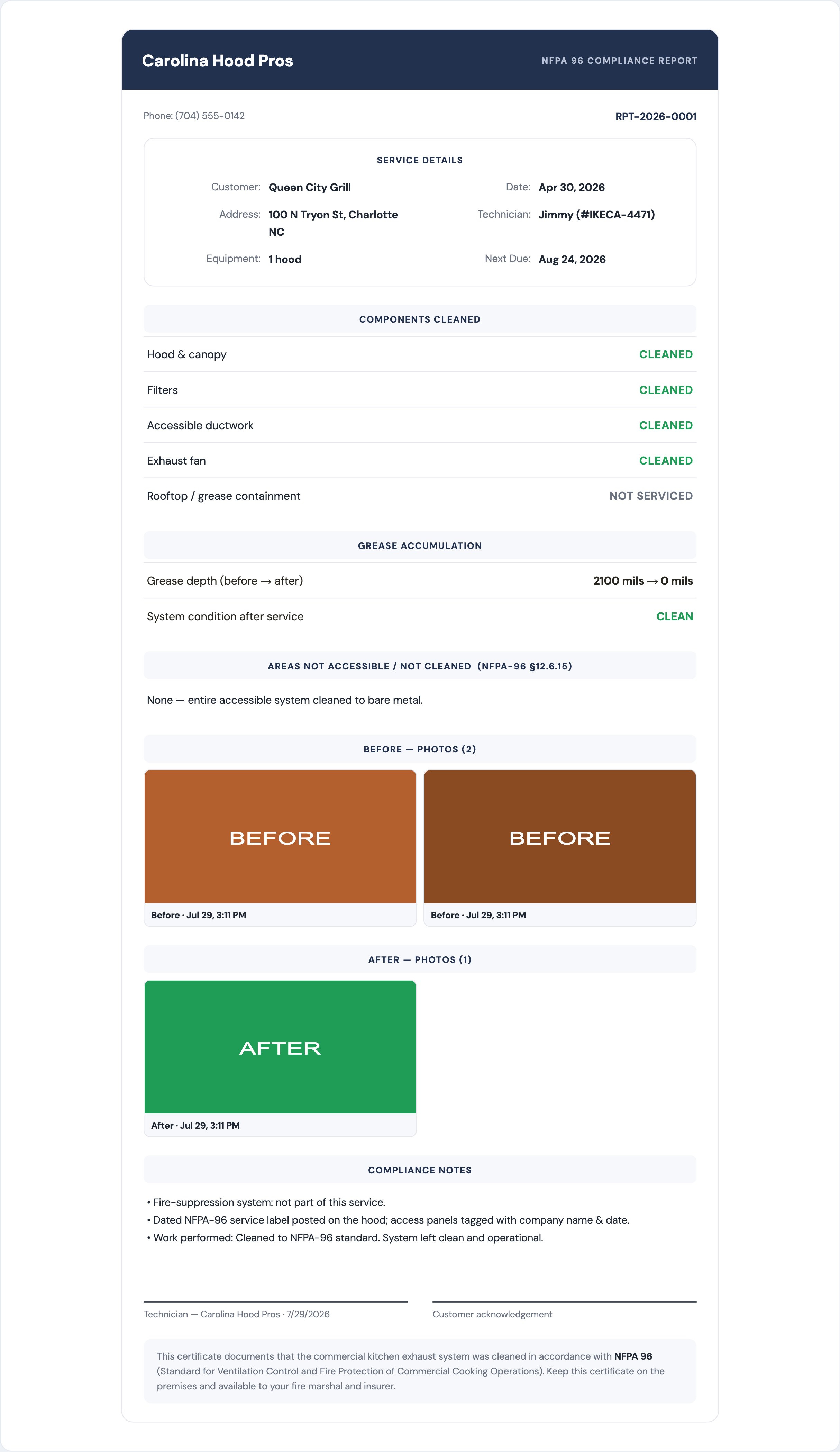
Finish a job, tap Make report, and out comes a clean, professional NFPA-96 report: service details, every component cleaned, grease depth in mils, areas not accessible under section 12.6.15, dual signatures, and a certificate formatted for the fire marshal and insurer.

It files itself into that customer's compliance history, so you can pull any report years later. This is the core of the app, and it is done right. The report reads like it came from an inspector, not a phone.

An NFPA-96 compliance report with components cleaned, grease depth, and before and after photos
A finished NFPA-96 report, with components, grease depth, and before and after photos.
Before and after photos, gated on completion

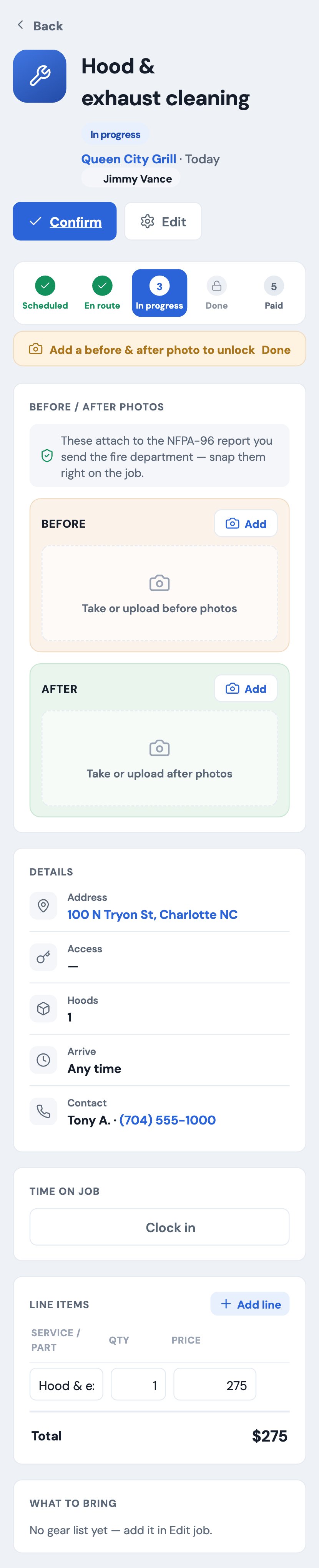
Snap before and after shots right on the job and they attach automatically in clearly labeled sections. A job cannot be marked done until both are there, so your documentation is never incomplete and your reports never go out missing the proof. The photos are the difference between a report a customer trusts and one they question.

Grease depth, deficiencies and signatures

Log grease depth before and after, note anything not accessible, capture the customer's and technician's signatures, and stamp the certifying tech's IKECA or license number, which is pulled in automatically from their profile. Everything an inspector or insurer looks for is on the page, filled in without extra typing.

Customizable, with report history and service stickers

Add any area cleaned, write extra compliance notes, and edit anything on the report, so you are never stuck when a job does not fit a template. Every report auto-archives into the customer's compliance history for you to pull years later, and you can print a dated NFPA-96 service sticker for the hood on the spot.

Technicians, crew & dispatch

Your whole crew's day, on one board.

Give every tech a real profile, drag jobs onto their calendar, and track hours for payroll.

Full technician profiles

Give every tech a real profile: contact info, IKECA, license, or cert number, truck or vehicle, and pay (hourly, salary, or per job), plus an emergency contact and notes. Their cert number even auto-fills their NFPA reports, so the paperwork shows the right credentials with zero extra typing. Add a technician in one form, and they are ready to dispatch.

The scheduling board, drag or tap

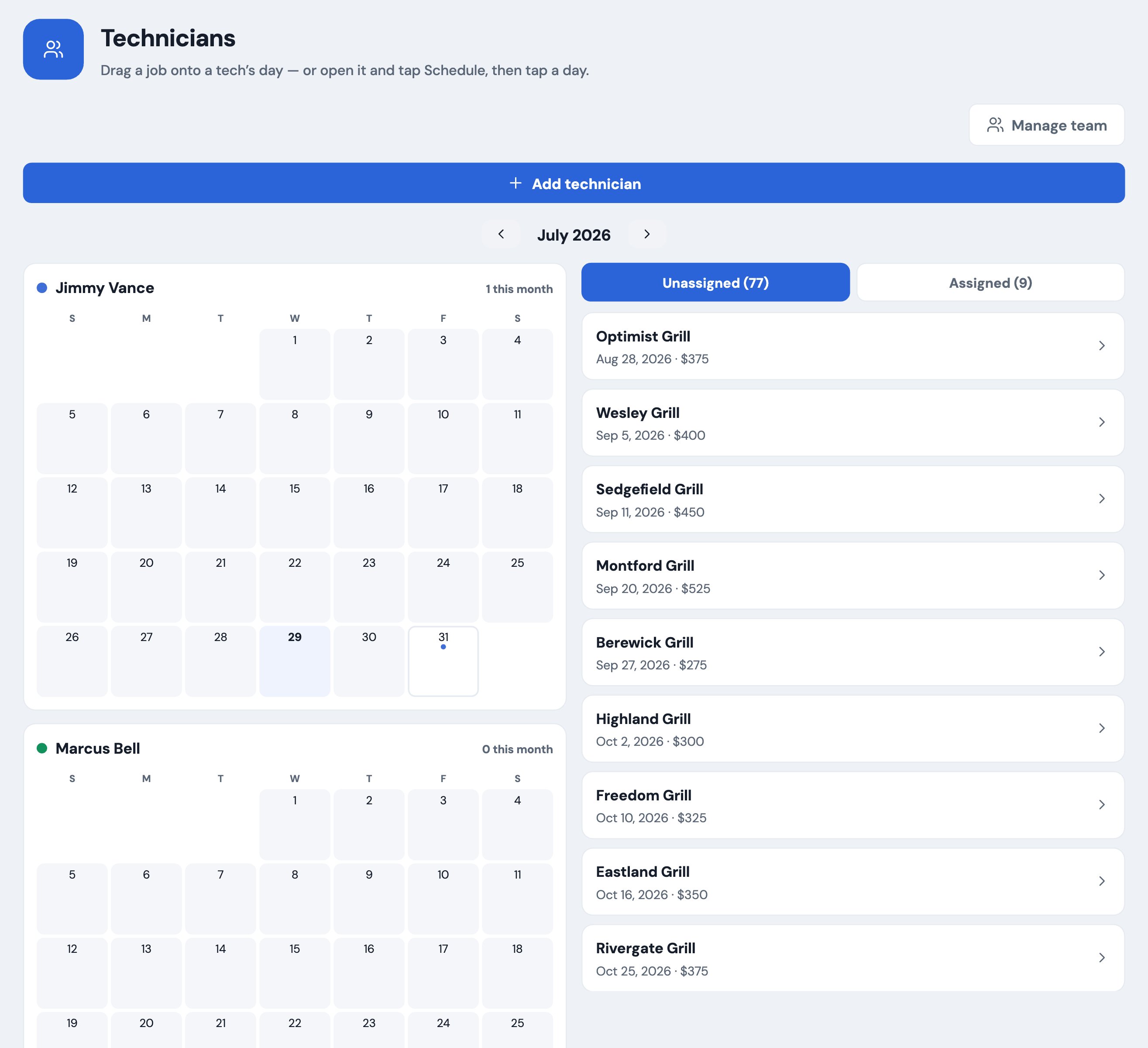
On desktop, each tech has a name and a mini calendar on the left, and the unassigned jobs sit on the right. Drag a job onto a day to schedule it, and a popup confirms the date, time, and notes. It writes straight through to the job and the customer, stamped with the tech's name.

On the phone, where drag-and-drop is awkward, the same board becomes a fast tap-to-assign flow, so dispatch works in the truck too. Reassign in seconds when plans change.

The technicians scheduling board with per-tech calendars and a draggable list of unassigned jobs
The scheduling board: per-tech calendars on the left, jobs to assign on the right.
Time tracking and payroll hours

Techs clock in and out per job, and hours roll up by technician for the week. That is payroll without a second app or a paper timesheet, and it doubles as a record of how long each kitchen actually takes.

Accountability, and a whole crew at once

Every job, customer, and report is stamped with the tech who did it, so you always know who was on which cleaning. No more "who did the Riverside job last month?"

Your whole crew can work in the app at the same time, and simultaneous edits merge safely instead of overwriting each other. Separate, money-hidden logins for each technician are on the way.

Getting paid

Stop being your customers' interest-free bank.

See who owes you and how overdue, remind them in a tap, and get the money into your account.

The money-owed cockpit

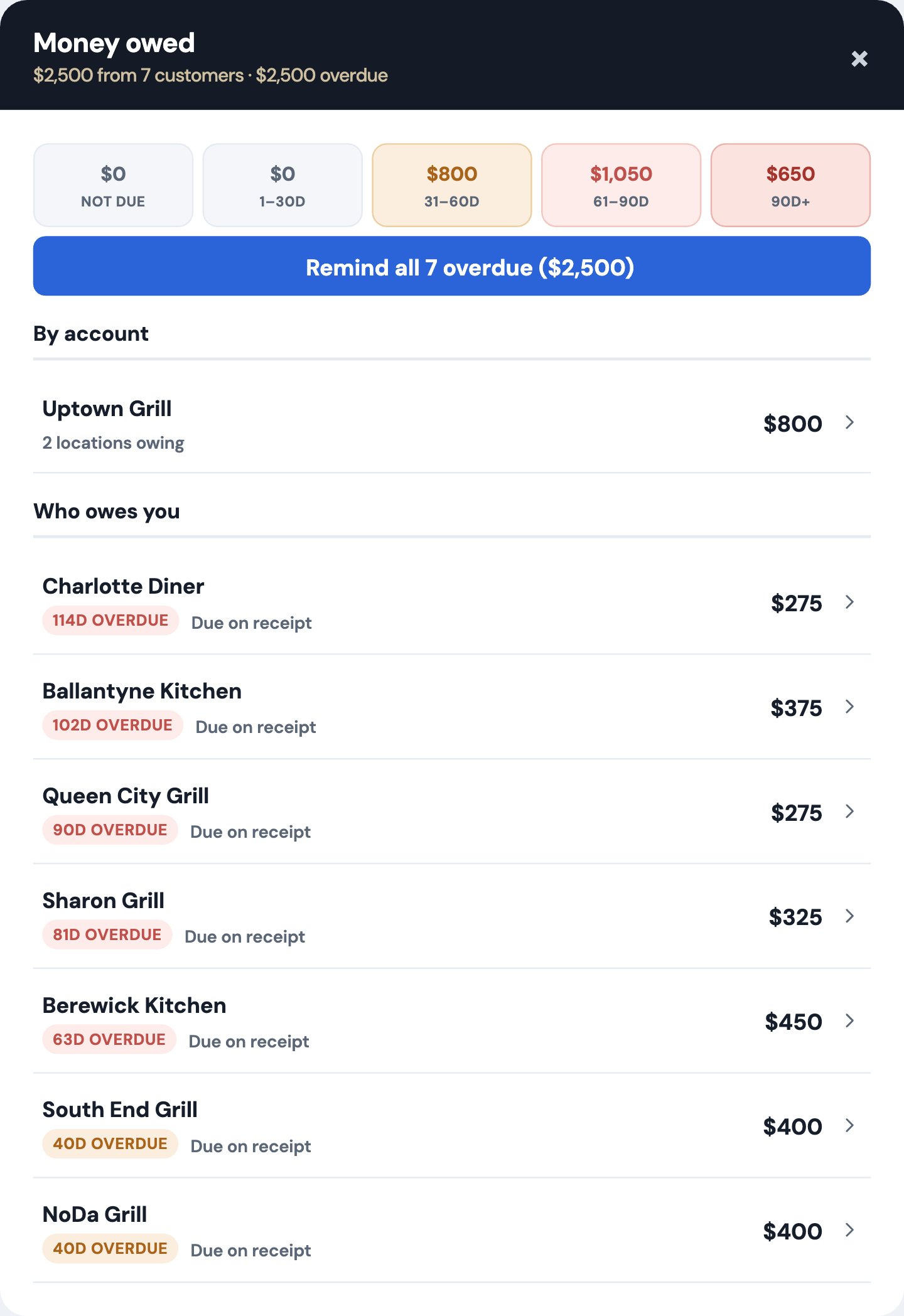
Tap money owed and see exactly who owes you and how overdue, sorted worst first, in aging buckets: Not due, 1 to 30, 31 to 60, 61 to 90, and 90 plus. Your morning cash-flow question, answered in one screen instead of a spreadsheet.

Every row drills straight into that customer, so a nudge is one tap from the number that is bothering you.

The accounts-receivable aging view showing who owes you and how overdue, in buckets
Money owed: aging buckets, sorted worst first, each drillable to the customer.
One-tap batch reminders

Nudge every overdue customer at once, call-first because restaurants are landlines, and it logs the outreach automatically so you are not repeating yourself or wondering whether you already called. The whole overdue list handled in a couple of minutes.

Statements, deposits and late fees

Send a full account statement, request a deposit with the balance due on completion, and apply a monthly late fee to overdue balances. These are the tools that get slow payers moving, and they are built in, not bolted on from another app.

Card payments straight to your bank

Connect Stripe and customers pay by card straight into your bank, and the job marks itself paid. Prefer Square, PayPal, Venmo, Cash App, or Zelle? Drop in your link or handle and it rides on every invoice and reminder, so the customer always has an easy way to pay you now.

QuickBooks export

Export your customers and invoices as a QuickBooks-ready file, so you never type the same invoice twice for your bookkeeper. A direct one-click sync is on the roadmap.

National & chain accounts

Win the chains, without the double-entry hell.

The workflow no competitor solves: capture the job once, submit it to the portal, and track the long net terms.

Parent and chain hierarchy

Group many locations under one parent account, so a chain's dozens of restaurants roll up cleanly instead of cluttering your customer list, and you can see the whole relationship at once.

Work-order tracking

Track the details chains require on every job: the work-order number, which portal it came from, the PO, and the due date, plus a submitted status so nothing slips past a deadline. The stuff that gets an invoice rejected is captured up front.

The proof-of-service package

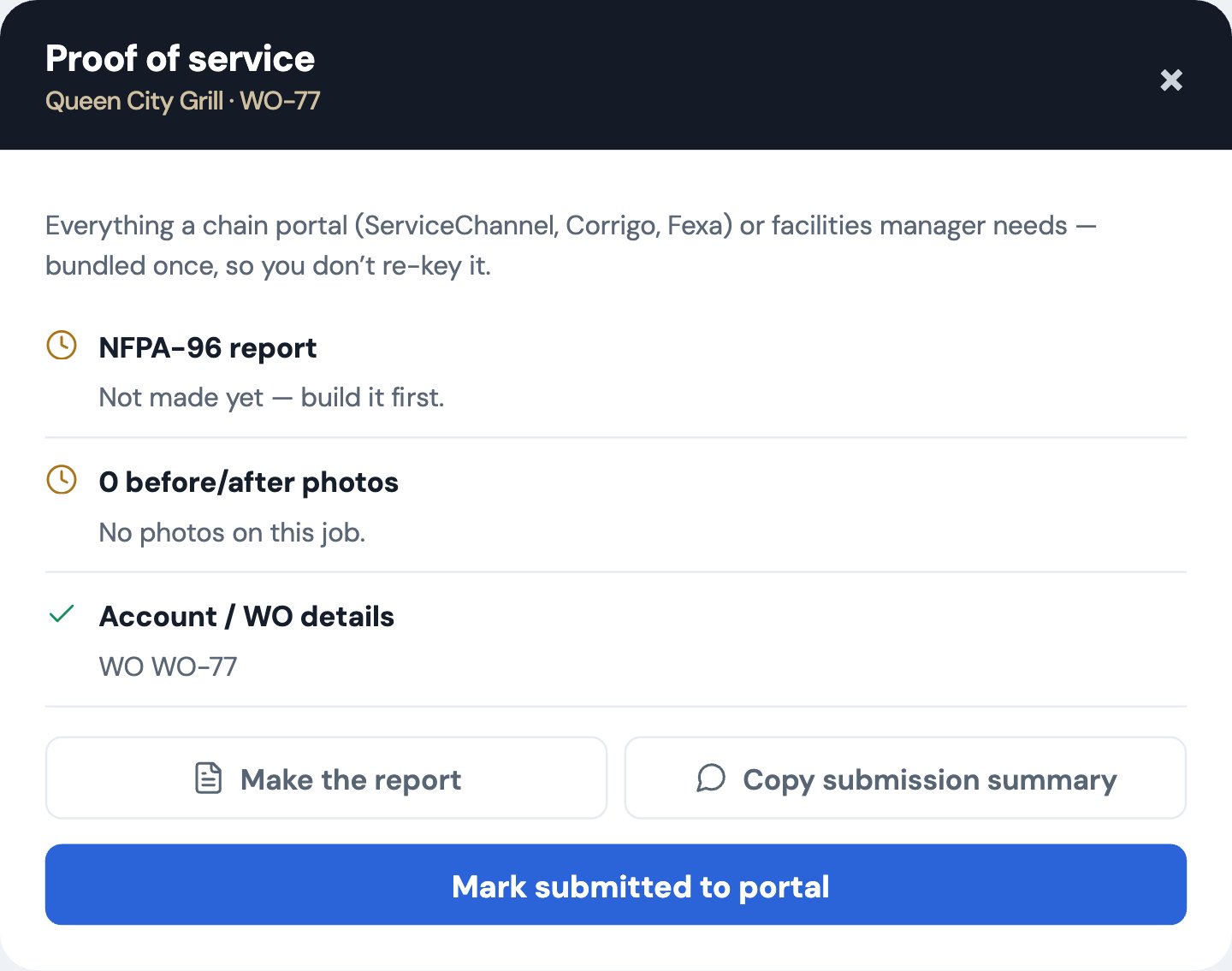
Bundle the report, photos, and certificate into a one-tap package ready to submit into ServiceChannel, Corrigo, or Fexa. You capture the job once instead of re-keying every report into a portal just to get paid. Copy a clean submission summary, then mark it submitted so you always know what still owes a portal upload.

This is the wedge nobody else in the trade offers, and it is the difference between chains being worth it and being a paperwork tax.

A proof-of-service package bundling report, photos and certificate for chain portals
Proof of service: report, photos, and certificate, packaged for the portal.
Net-60 and net-90 A/R by account

See what a whole chain owes across all its locations, so you can manage the long net terms these accounts pay on without losing track of a single site. The rollup by parent account keeps a 60 or 90 day payer from disappearing into a hundred small balances.

Keep the schedule full

Retention and growth, on autopilot.

Rebook every account, win back the ones that lapsed, and turn happy jobs into reviews and referrals.

Smart reach-out cadence

Kitchen Tracker reminds you to reach out at the right time: a heads-up before a cleaning is due, and a follow-up rhythm after, with the texts written in your own voice, ready to send. You are the one saying "you're due" before a competitor does, and you set the cadence per customer.

Mark-contacted and follow-ups

Log how you reached a customer (call, text, or email) and the result, then set a follow-up reminder so a "waiting to hear back" never falls through the cracks. Every account keeps a running history of who you talked to and when.

Win-back list for lapsed accounts

It automatically surfaces accounts that have fallen out of cadence, so you can re-earn them with a quick nudge before they forget your name. The customers you lost track of become a to-do list, not a memory.

Automatic review requests

Right after a clean job, the best possible moment, it prompts the customer for a Google review, so your reputation grows without you having to remember to ask. Set your review link once and it rides along every time.

Referrals and a lead inbox

A refer-a-friend loop rewards word of mouth, and a lead inbox turns missed calls and booking-page requests into customers in your pipeline instead of lost opportunities. New work lands in one place, ready to book.

Documents & paperwork

Everything auto-filled, signed, and on file.

Quotes to receipts, filled with your info and the customer's, ready to send in seconds.

Every document, pre-filled

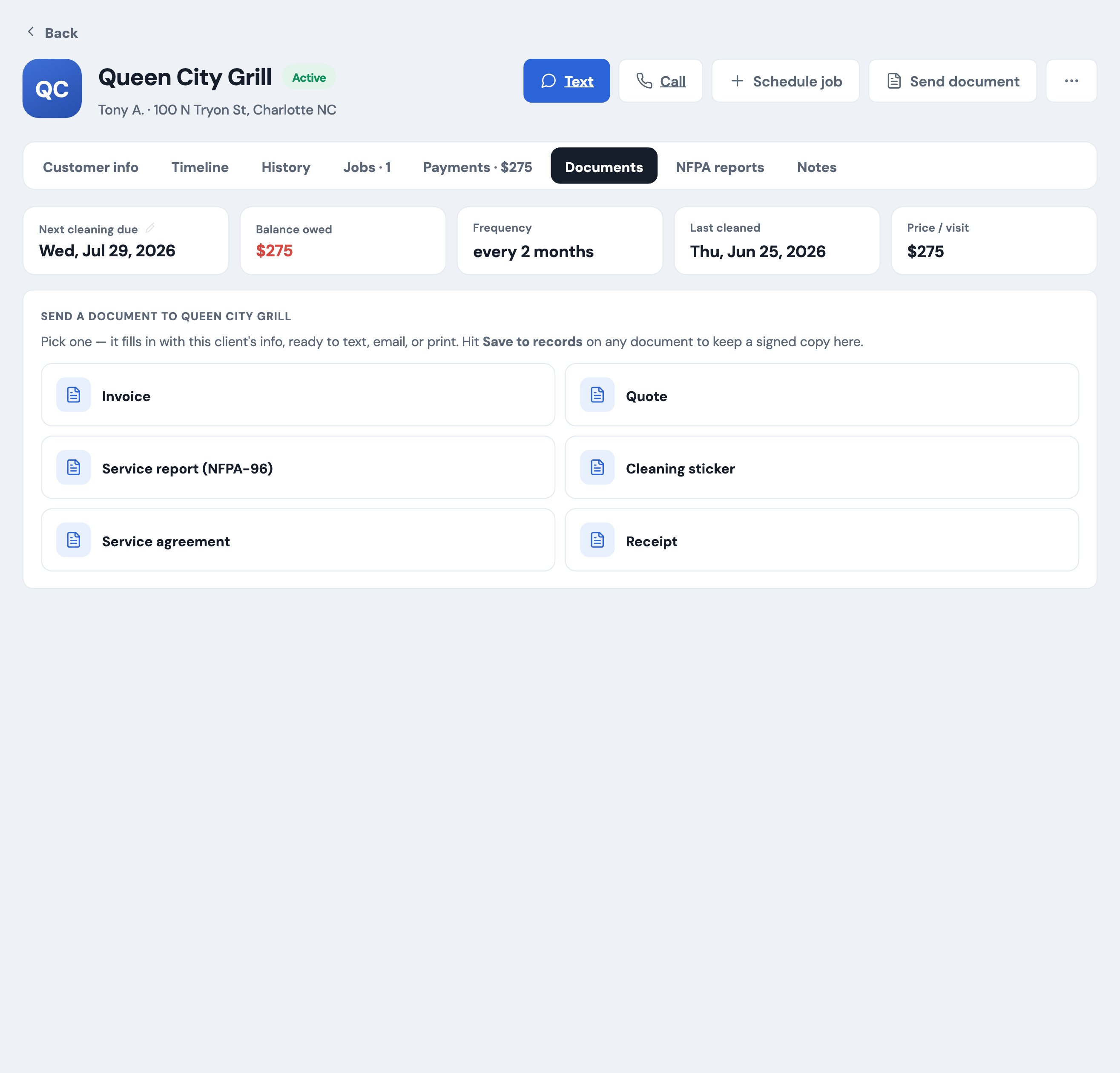
Quotes, customizable service agreements, invoices, receipts, checklists, stickers, and intake forms, all pre-filled with your business and the customer's info, ready to text, email, or print. No re-typing your license number or their address on every job.

Digital signatures and saved copies

Sign documents on the spot and keep a signed copy on file for every customer, so agreements and receipts are always exactly where you left them. Nothing lives only in a text thread or a glovebox.

Your data, security & reliability

You're trusting it with the whole business. Here's why that's safe.

Built to be safer than the notebook and spreadsheet you're on now, and it will never hold your data hostage.

Secure cloud, not one phone

Everything saves to your private cloud storage and syncs to every device your crew signs into. Break or lose a phone and nothing is lost, you sign in on a new one and it is all there. The business does not live or die with one device.

Conflict-safe multi-device sync

Two phones can edit at the same time and nothing gets overwritten. Simultaneous changes merge instead of clobbering each other, so a busy crew never loses a customer or a job to a sync collision. You do not have to think about who saved last.

Photo storage that never loses a shot

Before and after photos upload to durable cloud storage the moment you take them, with a retry queue that finishes the upload even if your signal drops or the app closes mid-job. The proof on your compliance reports is always there when you go to send them.

Automatic daily backups

Your database is backed up every day with point-in-time recovery, plus an optional local copy to your own computer. Belt and suspenders, the way your livelihood deserves.

Your data is yours, no lock-in

Export everything in one tap: a full backup, spreadsheets of your customers and jobs, and a QuickBooks file. If you ever want to leave, you take it all with you. No hostage situation, ever, which is exactly how you should be able to trust the tool that runs your business.

Works when the kitchen doesn't

Offline-resilient by design. Keep working with no signal in a basement kitchen or on a rooftop, and it syncs the second you are back online. A dead spot never stops the job or costs you a record.

Know your numbers & get set up

See the health of the business, and be live in an afternoon.

Free live demo and guided setup

Try the whole thing with a real hood-cleaning company's data: 90 accounts, real jobs, real reports, no signup and no card. When you are ready, a guided setup walks you through your first customer, quote, and report so you are productive fast, with a progress checklist that gets you to a live business quickly.

Set once, fills everywhere, and make it yours

Enter your business name, logo, license, and review link once and it fills into every document and message automatically. Turn features on or off, rename tabs, and write your own message templates so the app fits how you already work. Real support is a tap away, with a full help section built in.

In the field

It's a full desktop app, and it's in your pocket, too.

Run the office from a computer, and take the whole thing to the roof. Kitchen Tracker is offline-resilient, so you can pull up the day's route and jobs with no signal and it syncs when you are back online.

Your restaurants on a map with the day's route, on a phone

Your route for the day

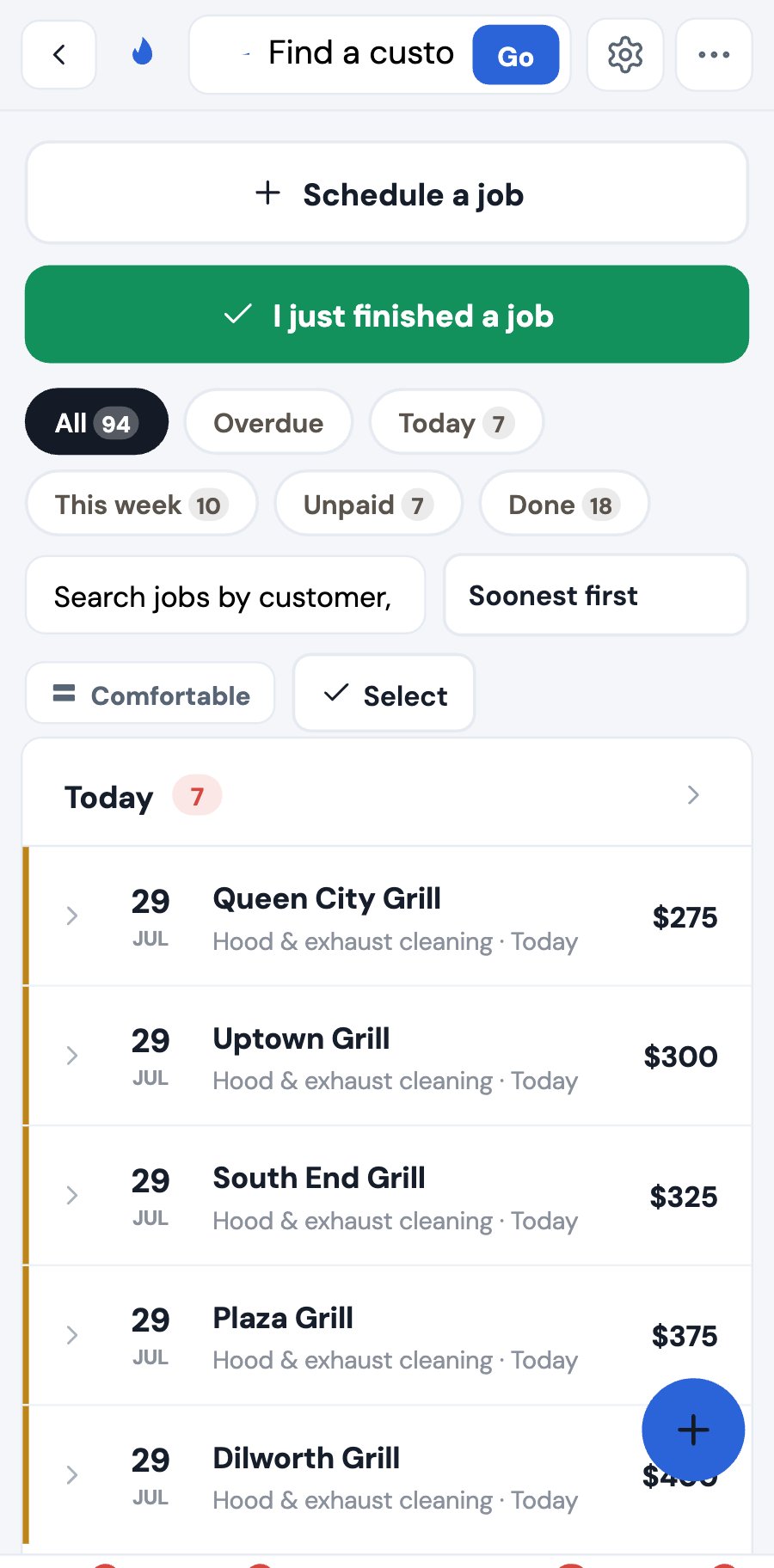
The day's jobs, on a phone

Every job for the day

A single job with before and after photos, on a phone

Photos and report on site

Why owners switch

The right tool for this trade, not a compromise.

Notebook & spreadsheet

Where most start
  • โœ•  Forgotten rebookings and lost revenue
  • โœ•  Paper reports the fire marshal questions
  • โœ•  No idea who owes you
  • โœ•  Falls apart the day you add a truck

Generic field-service apps

Jobber, Housecall, ServiceTitan
  • โœ•  Don't know NFPA-96
  • โœ•  No proof-of-service for chains
  • โœ•  Enterprise pricing, roughly $398 a tech
  • โœ•  Heavy setup, built for other trades

๐Ÿ”ฅ Kitchen Tracker

Built only for hood cleaners
  • โœ“  Never-miss rebooking and NFPA reports
  • โœ“  Get-paid tools and QuickBooks
  • โœ“  Crew, dispatch and national accounts
  • โœ“  Small-business price, 30-day guarantee
Straight answers

The questions every owner asks.

No fluff. If something's not built yet, we say so.

I've run fine on a spreadsheet and my texts. Why change?
The spreadsheet doesn't remind you to rebook the account you're about to lose, doesn't produce an NFPA-96 report the fire marshal accepts, and doesn't tell you who's 60 days late. Most owners make back the cost in the first rebooking they'd otherwise have forgotten.
Is my data actually safe? What if you disappear?
It's in secure cloud storage, backed up daily with point-in-time recovery, and synced to every device, far safer than a single phone. And with one tap you can export everything (a full backup, spreadsheets, and a QuickBooks file), so if you ever leave, you take it all. No lock-in, ever.
Do I have to type in all my customers by hand?
No, you can import years of history from a spreadsheet in a few minutes, so you start with your whole book of business. Most owners are set up in an afternoon.
Will it work with bad signal in a kitchen?
Yes, it's offline-resilient for basement kitchens and rooftop fans. Keep working with no signal and it syncs when you're back online; photos queue and finish uploading automatically, so a bad connection never costs you a photo or a report.
I only have one truck. Is this overkill?
No, it stays simple for the solo owner and hides the crew and national-account tools until you need them. You get the parts that matter most today: never-miss rebooking, phone-fast NFPA reports, and get-paid tools. When you add a truck, the crew features are already there.
What does it cost?
It's priced for a small business, a fraction of the enterprise tools that charge hundreds per technician. The right plan depends on your size and add-ons, so we'll walk you through it on a quick call, backed by a 30-day money-back guarantee. Contact us โ†’

See it with a real hood-cleaning company's data in 5 minutes.

No signup, no card, just tap around the live demo. Then reach out and we'll get you set up and talk pricing for your operation.

Sign up now โ–ถ Try the live demo Contact us to schedule a live demo
๐Ÿ›ก๏ธ 30-day money-back guarantee. If it doesn't earn its keep, you don't pay.